




Getting the timing of your MIDI notes just right is crucial for creating a tight groove and a professional feel in your music. While clicking and dragging notes in the FL Studio Piano Roll is the standard method, it can sometimes feel a bit clumsy when you need to make very small, precise adjustments to a note’s position.
What if you could “nudge” notes with the accuracy of a surgeon, using a tool you already have at your fingertips? This is my favorite trick for speeding up my workflow and perfecting the human feel of my rhythms.
Unlocking a Hidden Piano Roll Setting
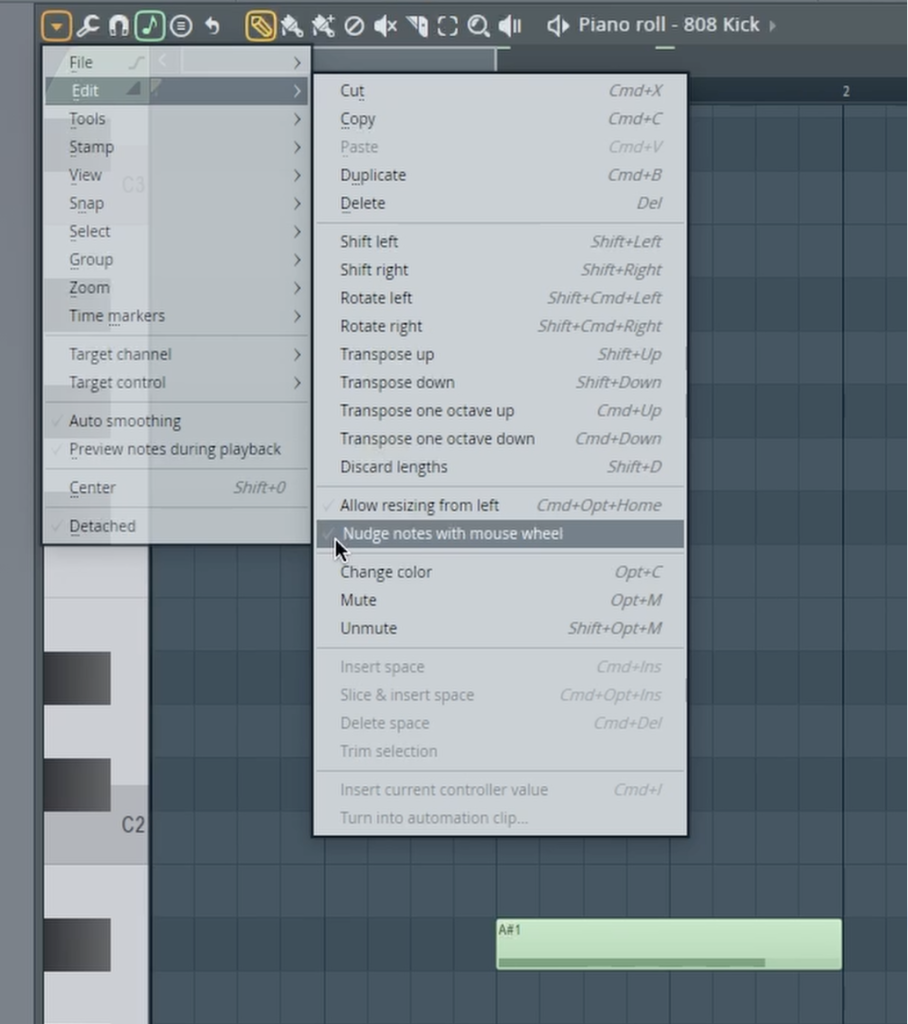
Deep within the Piano Roll’s menu lies a simple setting that can completely change how you edit MIDI. It allows you to use your mouse’s scroll wheel to make micro-adjustments to the timing of your notes, a process often called “nudging.” It’s turned off by default, but enabling it is easy.
Here’s how to turn it on:
- Open the Piano Roll for any instrument.
- Click the arrow in the top-left corner to open the Piano roll options menu.
- Navigate to the Edit submenu.
- Find and enable the setting called “Nudge notes with mouse wheel.”
How to Use It: The Shift + Scroll Combo for Ultimate Precision
With this powerful setting enabled, a new, incredibly precise editing method is unlocked. It allows you to move notes off the grid with finite control, without ever having to change your snap settings.
Here’s how it works:
- Select the note (or multiple notes) you want to move.
- Hold down the Shift key.
- Simply use your mouse scroll wheel to move the selected notes left or right on the grid.
This simple combination gives you fine-tuned control over your note placement, making it incredibly easy to slightly delay a snare hit for a lazier feel, or push a hi-hat forward to add urgency. It’s a much faster and more intuitive way to handle micro-timing than repeatedly zooming in and dragging with your mouse.
For a quick visual guide on how to enable and use this amazing feature, be sure to watch the full video.