



Did you know you can create that popular, rhythmic vocal stutter or “gating” effect using a simple tool you already have in Ableton Live? This creative vocal trick is perfect for adding energy to your transitions, creating memorable ear candy, or adding a modern flair to any vocal phrase.
It’s a two-part process that combines creative time-stretching with a clever use of the Auto Pan effect to act as a volume gate. Here’s how you can do it in just a few steps.
The Vocal Stretch & Stutter Technique
This effect works best on the last word or syllable of a vocal line, transforming its tail into a rhythmic pulse that syncs perfectly with your track.
Step 1: Isolate and Stretch Your Vocal Tail
First, you need to find a vocal sample to work with.
- Drag your chosen vocal sample into Ableton Live’s timeline.
- Using the Slice tool (Cmd+E on Mac / Ctrl+E on Windows), cut the last word of the vocal phrase to isolate it onto its own clip.
- Double-click the new clip to open the Detail View. Change the Warp Mode from “Beats” to “Complex” or “Complex Pro”. This algorithm is designed to preserve the natural tonal quality of complex signals like vocals when they are time-stretched.
- Now, hover your mouse over the end of the audio clip until the cursor changes. Hold down the Shift key and drag the end of the clip to the right. This will stretch the audio to your desired length, creating a long, sustained vocal note. At this stage, it might sound a bit unnatural or artifacted, but that’s where the magic comes in.
Step 2: Create the Rhythmic Stutter with Auto Pan
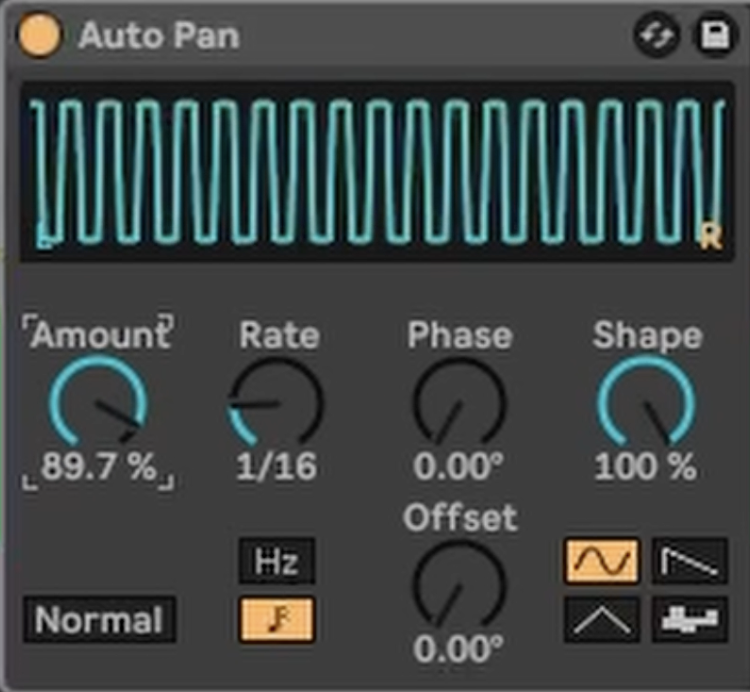
This is the secret to the effect. We are going to use Ableton’s Auto Pan device not for panning, but as a rhythmic volume gate.
- Drag an Auto Pan audio effect from the browser onto your stretched vocal track.
- Adjust the settings as follows:
- Rate: Sync the rate to the rhythm of your track. A setting of 1/16 is a great starting point for a classic stutter effect.
- Phase: Turn the Phase knob all the way down to 0°. This is the most crucial step. It stops the sound from panning left and right and instead makes the effect modulate the volume up and down.
- Shape: Set the Shape to 100% to get a hard, square-wave shape. This will create a sharp on/off gating effect rather than a smooth fade.
- Amount: Finally, turn up the Amount knob. You will instantly hear the stretched vocal tail transform into a rhythmic, pulsing stutter that’s perfectly in time with your song.
This simple but powerful combination of techniques is a fantastic way to add movement, energy, and a professional touch to your vocal production.
To see this vocal effect created from start to finish, be sure to watch the full video!