




No matter how long you’ve been using a DAW, there’s always a new feature or hidden gem waiting to be discovered. Even after years of producing, you can stumble upon a tool that completely changes your workflow. This is one of those tools.
If you’ve ever been stuck in a rhythmic rut, clicking in the same old drum patterns, prepare to be amazed by a powerful, creative feature tucked away inside FL Studio’s Channel Rack: Advanced Fill.
Break Free from Standard Beats
While the step sequencer is great for building foundational grooves, it can sometimes feel limiting. The “Advanced Fill” tool is a clever and intuitive rhythm generator that helps you create completely new and complex drum patterns in seconds, sparking instant inspiration.
It’s the perfect way to add intricate hi-hat rolls, unique percussion lines, or experimental kick patterns that you might not have thought of on your own.
How to Find and Use “Advanced Fill”
Accessing this feature is surprisingly simple, which is why it’s so often overlooked.
- Open the Channel Rack in your FL Studio project.
- Right-click on the name of any sample or instrument in the rack (e.g., a tambourine, clap, or hi-hat).
- From the context menu, select “Advanced fill…”
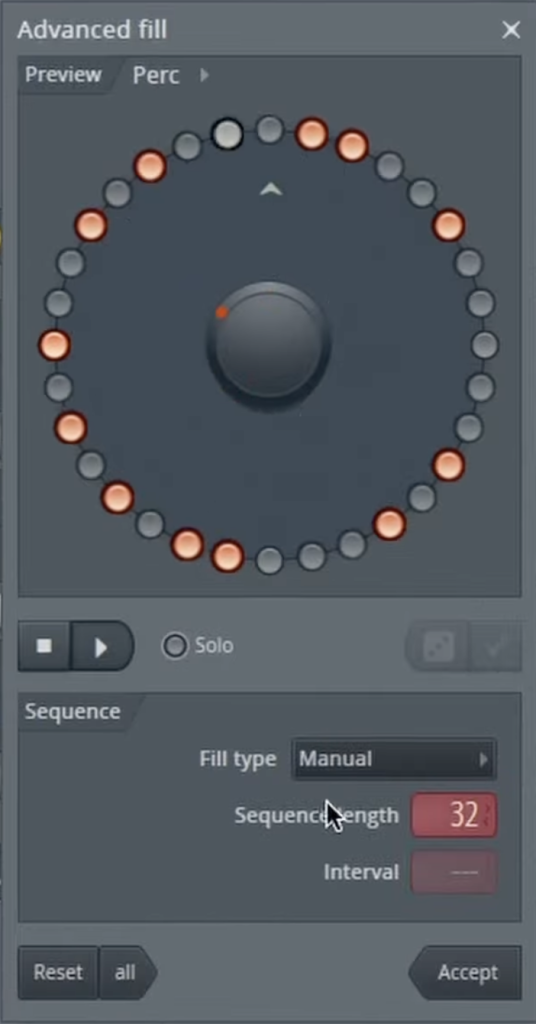
This will open a new window with a circular step sequencer. Here, you can visually design complex rhythms by activating steps on the wheel. You can also adjust parameters like the sequence length and the interval between hits to create everything from simple patterns to complex polyrhythms. It’s a highly creative and visual way to program your drums.
Find Your Sounds
All the sounds you heard in the video’s demonstration come from the Synthwave Drum Sample Pack. This is a great example of how high-quality samples can be brought to life in new and exciting ways using FL Studio’s creative tools.
To see a full demonstration of the “Advanced Fill” tool and how it can be used to create unique drum rhythms on the fly, you have to watch the video!