




Arranging your track in FL Studio often involves a lot of copying and pasting. You create a great drum pattern, and then you have to duplicate it over and over again throughout your song. While this works, it can be tedious and clutter your playlist. But what if you could just drag out a single pattern and have it loop forever?
There’s a simple, one-click feature built right into FL Studio that allows you to do exactly that, dramatically speeding up your arrangement workflow.
Introducing the “Loop All Steps” Feature
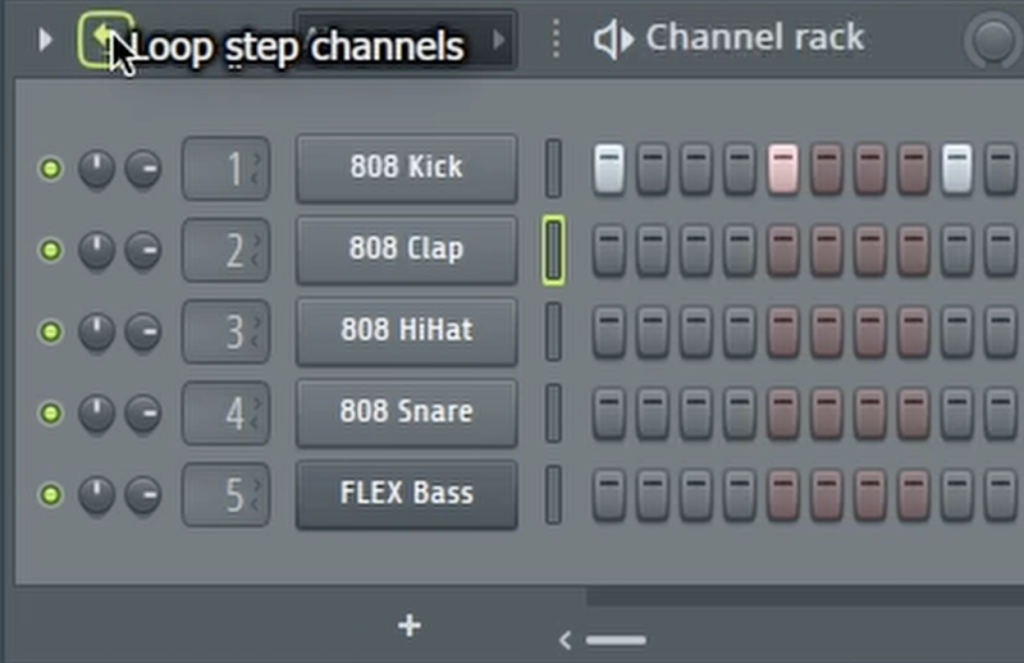
This lesser-known but incredibly useful function is located in the Channel Rack. When activated, it tells FL Studio that any pattern you place in the playlist should loop continuously as you drag it out. This means you no longer need to manually copy and paste the same pattern multiple times to fill a section of your song.
How to Activate Infinite Looping
Getting this feature up and running is incredibly simple and will change the way you arrange your tracks.
- Open the Channel Rack for the pattern you want to loop.
- At the top of the Channel Rack window, look for a small icon of a looping arrow. Click it.
That’s it! Now, go back to your playlist. You can click and drag the right edge of your pattern clip, and it will loop indefinitely, filling as much space as you need. This works for any pattern, from drum beats to melody lines.
A Faster Way to Arrange Your Tracks
This simple trick is a huge time-saver. It allows you to quickly sketch out your song’s structure without the repetitive task of duplicating clips. You can lay down an 8-bar loop, drag it out for 64 bars, and then focus on adding other elements and automation. It keeps your playlist clean and makes experimenting with arrangement ideas faster and more intuitive.
To see a quick visual of where to find this looping button and how it works in the playlist, be sure to watch the full video!