





Have you ever found an amazing melodic sample or loop but struggled to figure out the exact notes being played? Transcribing audio by ear can be a time-consuming and difficult process, especially for complex melodies. But what if you could visually decode any melody in real-time, directly within FL Studio?
There’s a powerful, and perhaps the most underrated, native tool that can do just that. It’s called Wave Candy, and it’s about to become your new secret weapon for analyzing and understanding audio.
Introducing Wave Candy: Your Personal Melody Analyzer
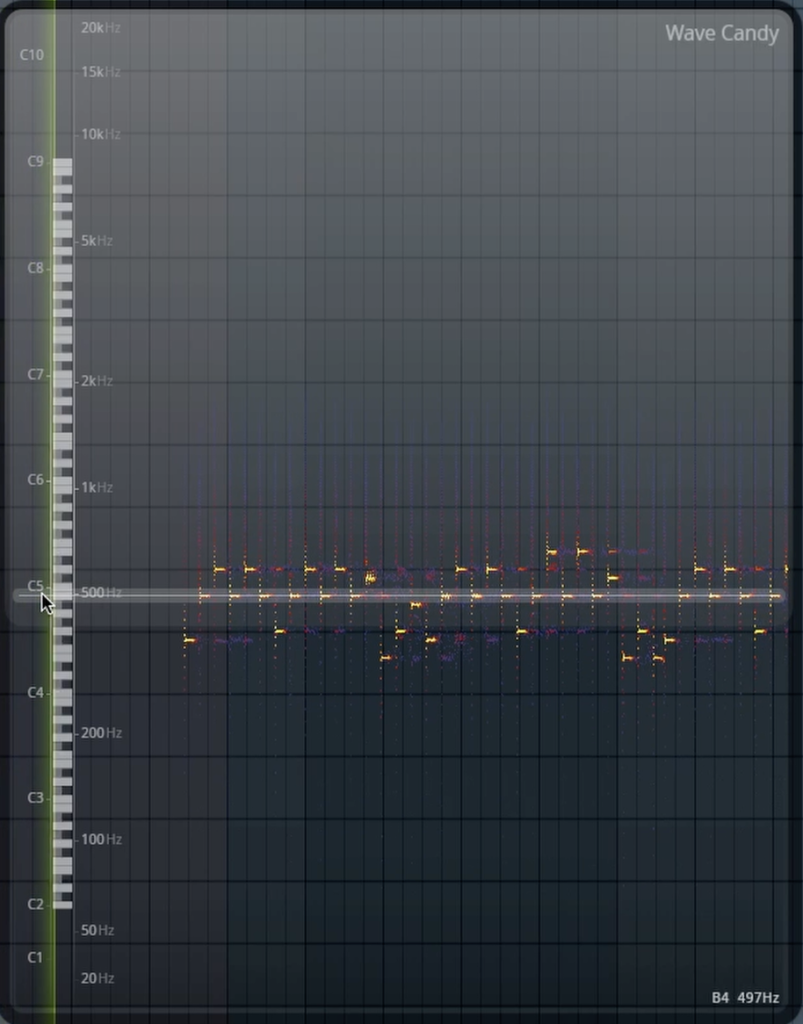
While most producers know Wave Candy as a standard oscilloscope or spectrum meter, its true power lies in its ability to be configured as a real-time “piano roll” for any audio source. By tweaking a few simple settings, you can make Wave Candy display the harmonic content of a sample in a way that visually represents the individual notes, making it incredibly easy to see the melody as it plays.
How to Visualize Melodies with Wave Candy: A Step-by-Step Guide
This technique is simple to set up and provides instant results, helping you learn melodies, write harmonies, and understand the composition of your favorite samples.
- Add Wave Candy to Your Sample’s Mixer Track
Start by routing your melodic sample to a free mixer track. Then, add an instance of the “Wave Candy” plugin to one of the effect slots on that track. - Switch to Spectrum and Tweak the Settings
In the Wave Candy window, change the view mode from the default “Oscilloscope” to “Spectrum.” Next, locate the “dB range” knob and turn it all the way down. This cleans up the display, making the fundamental notes of the melody much clearer and easier to see. - Resize and Align with the Piano Roll
This is the key to making the visualizer intuitive. Click and drag the edges of the Wave Candy window to stretch it vertically. As you stretch it, you’ll see a piano key reference appear on the left side. Align this with the piano roll in your playlist background so that the visualizer mirrors the layout of the piano roll. - Play Your Sample and See the Melody
Now, simply play your melodic sample. You will see the notes light up on the Wave Candy spectrum in real-time, showing you the exact pitch and rhythm of the melody. For a closer look, you can click the snowflake icon to “freeze” the display, allowing you to examine the notes of a specific moment more closely.
Why This Technique is a Game-Changer
Using Wave Candy in this way is more than just a cool visual trick; it’s a powerful tool for any producer. It allows you to quickly learn melodies from audio, write complementary basslines and harmonies with confidence, and even serves as a great ear-training aid by visually confirming the notes you are hearing.
To see a clear, step-by-step walkthrough of this incredible FL Studio feature, be sure to watch the full video!