




If you want to create better, more compelling melodies, you need to know this simple but powerful trick. Writing melodies that sound musically correct can be challenging, especially if you’re not deeply familiar with music theory. Hitting a wrong note can instantly ruin a great idea. But what if FL Studio could act as your guide, ensuring you never play a note out of key again?
It can, and it’s easier than you think.
Introducing Piano Roll Scale Highlighting
Hidden in plain sight within FL Studio’s Piano Roll is a feature called Scale Highlighting. This tool visually guides your melody creation by changing the background color of the piano roll grid.
When you look at the grid, you’ll notice it’s made up of lighter and darker horizontal rows. This isn’t just for aesthetics; it’s a guide. The lighter rows represent the notes that are within your chosen musical scale, while the darker rows represent notes that are outside of it.
How to Activate and Use Scale Highlighting
By enabling this feature, you essentially create a “safe zone” for your melodies, making it effortless to stay in key.
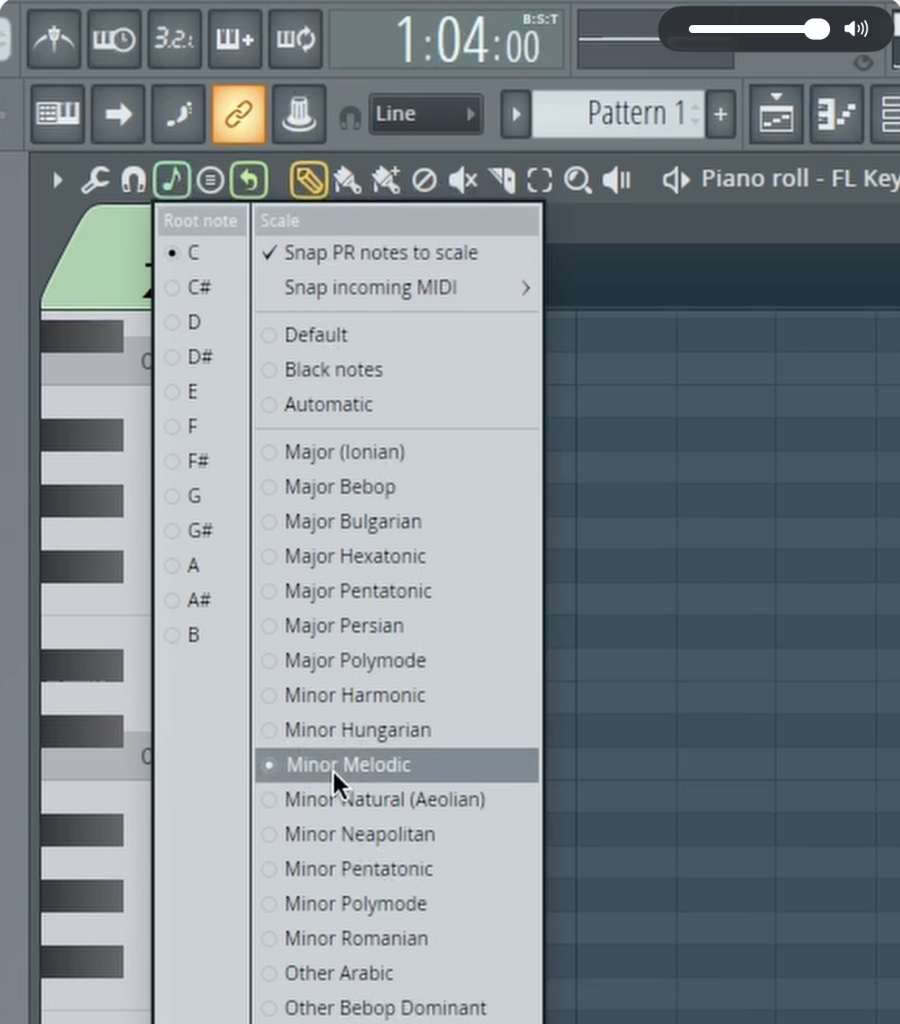
- In the Piano Roll, look for the “Note” icon in the top toolbar (it looks like a musical note with a small keyboard).
- Right-click on this icon to open the scale menu.
- First, select your Root Note (the key of your song, e.g., C).
- Next, choose the Scale you want to work in (e.g., Minor Melodic, Major, Dorian, etc.).
Once you’ve selected a scale, the Piano Roll grid will update. The lighter-colored rows will now perfectly correspond to the notes in that specific scale. FL Studio will now “lock” you to these notes, preventing you from accidentally clicking on the darker, out-of-key notes.
Revolutionize Your Songwriting Workflow
This simple feature is a complete game-changer for a few key reasons:
- No More Guesswork: It completely removes the fear of hitting a wrong note, allowing you to focus purely on rhythm and creativity.
- Boosts Creativity: It encourages you to experiment with scales and modes you might not be familiar with, unlocking new melodic possibilities.
- Speeds Up Your Process: Setting the scale at the very beginning of a session makes building chords and melodies incredibly fast and intuitive.
As you can see in the video, if you change the scale from C Minor to C Major, notes that were previously “correct” might now fall on a darker block, instantly showing you they are out of key. It’s a powerful visual aid that helps you learn and create simultaneously.
To see exactly how to set this up and watch it transform the melody writing process, be sure to check out the full video!